

What the MCP gateway does
GoModel can sit between your agent clients (Claude Code, Claude Desktop, Cursor, VS Code, …) and the MCP (Model Context Protocol) servers they use — the same way it already sits between your apps and model providers:- One endpoint, one key. Clients connect to
https://your-gateway/mcpwith a GoModel API key. They never hold upstream MCP credentials; the gateway injects each server’s headers itself. - Aggregation with namespacing. Tools and prompts from every configured
server appear in one catalog as
{slug}_{name}(for examplegithub_create_issue), in a stable, deterministic order. - Least-privilege discovery. A server can be scoped to
user_pathsand carved out withdisallowed_user_paths; hidden callers do not merely get errors — the tools never appear in theirtools/listat all. Operator-levelallowed_tools/disallowed_toolsfilters trim noisy servers, which keeps agent context small. - Observability. Every tool call becomes a usage entry (server, tool,
duration, sizes, error flag, labels, user path) and MCP requests appear in
the audit log and request log like any other model traffic — labelled with
the JSON-RPC method, and with the tool or prompt name for calls, so a
tools/callrow readsgithub_create_issue, not a bare path. WithLOGGING_LOG_BODIES=truethe JSON-RPC request and response frames are recorded on the audit entry as well (tool arguments and results included), subject to the same 1 MB capture cap as other endpoints. User-path rate limits and budgets gate MCP requests too.
Connect a client
Point any streamable-HTTP MCP client at the gateway and pass your GoModel key as a bearer token:/mcp— everything the key’s user path may see, namespaced./mcp/{slug}— a single server with its original tool names.X-MCP-Servers: github,jiraheader — a comma-separated subset on/mcp.
Search tools instead of listing them
Every tool intools/list is sent to the model on every turn. With a few
large servers that can be tens of thousands of tokens. Search discovery
replaces the list with two tools:
search_toolstakes keywords (or an exact tool name) and returns the matching tools with their descriptions and input schemas.call_toolruns a found tool bynamewith itsarguments.
call_tool, every call looks like the same tool to the client.
Search results and calls respect user paths and tool filters. Failures, such
as an unknown name or an unreachable server, come back as tool errors the
model can read and recover from. Usage entries and the request log record the
real tool name, not call_tool. If the catalog is only
large because of tools nobody uses, trimming it with
tool filters or X-MCP-Servers
is simpler and keeps tools listed directly.
Declare servers
Servers can be managed in the dashboard (MCP Servers page) or declared as infrastructure-as-code — declarative entries override same-slug dashboard rows and are read-only there: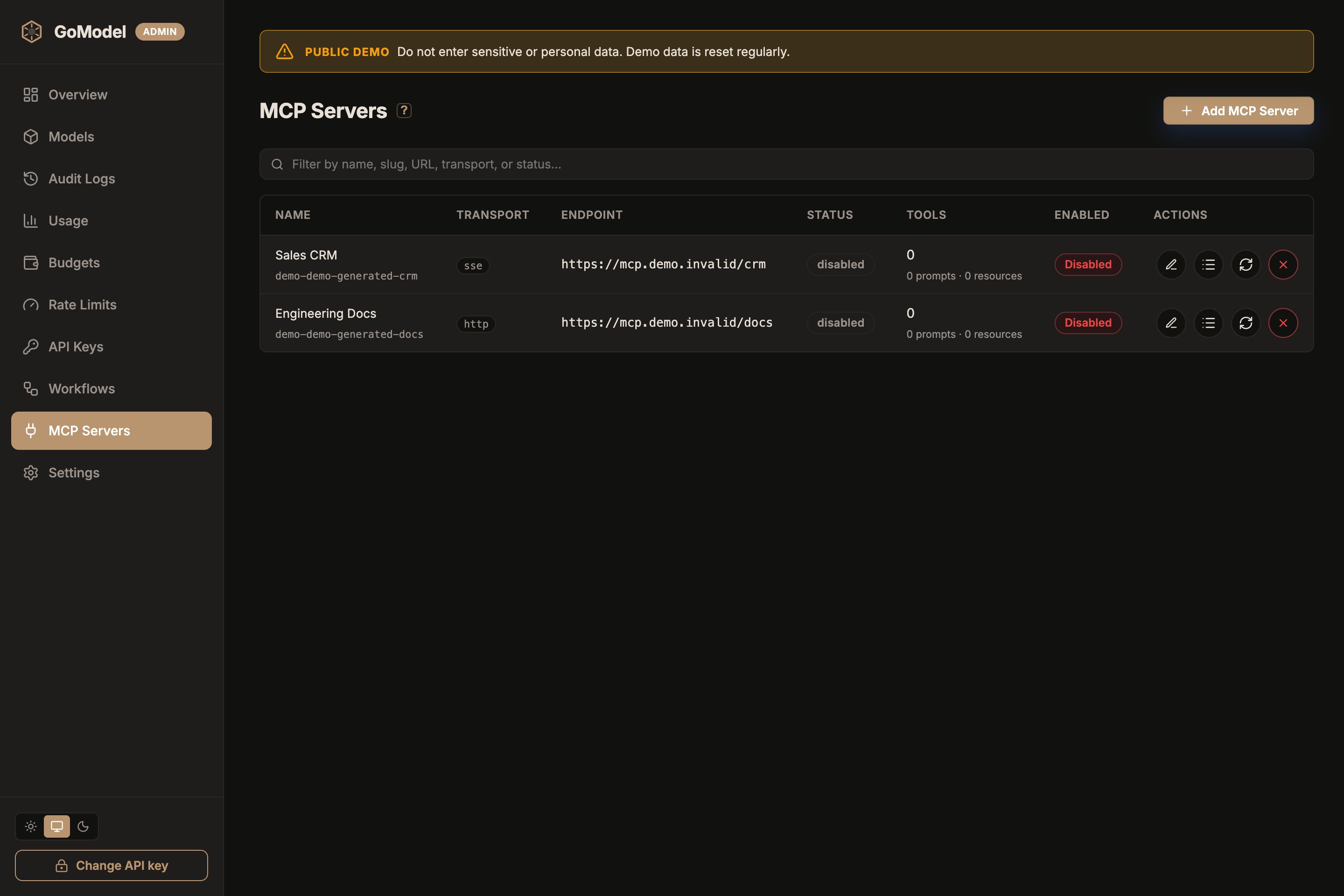
Add a server from the dashboard
Open MCP Servers and click Add MCP Server. Fill in:- Name — human-facing; you can rename it later.
- Transport —
http(streamable HTTP, default) orsse(legacy). - URL — the upstream MCP endpoint.
- Headers — upstream credentials (for example
Authorization: Bearer …); saved values are shown redacted afterward. - Tools — check the tools clients may use; see Choose which tools each server exposes.
- Optional user paths and excluded user paths under Advanced; see Limit who can see a server.
config.yaml or MCP_SERVERS show as read-only here.
Dashboard-managed servers have two identifiers:
- Name is human-facing, accepts Unicode, and can be edited later.
- Slug is derived from the name by default. It uses lowercase ASCII
letters, numbers, hyphens, and underscores, and can be adjusted while
creating the server. It becomes immutable after creation because it is used
in
/mcp/{slug},X-MCP-Servers, and aggregated tool names.
mcp.servers map key is the slug and is also
shown as the name in the dashboard.
MCP_SERVERS env var (a JSON object, merged over YAML per name):
Invalid declarations (bad slug, missing
url/command, unknown transport)
abort startup with a clear error rather than silently dropping the server.
Run stdio servers with Docker
The official image contains only the GoModel binary — no shell, Node, or Python — sonpx and uvx commands cannot start inside it. stdio servers
that ship as a static binary work: mount the binary and point command at it.
For everything else, run the stdio server in its own container behind a
stdio-to-HTTP bridge such as
supergateway, and declare it
as a regular http server:
Health and lifecycle
The dashboard shows each server as connected, degraded, connecting, or disabled, with tool counts and the last error, and the Overview page summarizes MCP server health whenever servers are configured. A server whose listing fails keeps its previous catalog (marked degraded) and is re-probed every 60 seconds; healthy catalogs re-list every 5 minutes and refresh immediately when the upstream sends alist_changed notification.
Reconnect on the dashboard (or POST /admin/mcp-servers/{slug}/reconnect)
forces a redial.
A server saved from the dashboard starts as connecting: the first dial runs
in the background so the save never blocks on upstream IO. The dashboard
re-checks every few seconds until the row settles on connected or degraded, so
no page reload is needed.
A last error of no MCP endpoint at that path means the URL answered the
handshake with HTTP 404: something listens there, but not an MCP endpoint at
that path. Servers mount their endpoint under different paths, so url must
include it — for example http://localhost:18080/http for mcp-devtools or
http://localhost:3000/v2/mcp for self-hosted Firecrawl. A last error
mentioning HTTP 405 means the path exists but rejects the handshake method,
which is what a streamable HTTP endpoint answers when transport is sse
(and an SSE endpoint when it is http): fix transport first, then the
path. Stateless servers (no Mcp-Session-Id) need no extra configuration.
A last error mentioning x509: certificate signed by unknown authority means
the server’s TLS certificate is issued by a CA the container does not trust.
See private CA certificates.
Choose which tools each server exposes
By default every tool a server reports is exposed. Trim a server’s tools to keep agent context small and to keep risky tools, such as deletes or merges, away from clients. In the dashboard, edit a server and use its Tools section. It lists every tool the server reports, with a checkbox for each, a filter box, and Expose all / Exclude all for the filtered rows. Tools the server annotates asread-only or destructive carry a badge. These hints come from
the upstream; GoModel does not verify them.
Tools the server adds later controls what happens when the upstream grows:
Choose Keep hidden for servers you do not control, so a new tool can never
reach clients without review.
You can also add a tool by name, for example before the server first
connects. Names the server does not report stay in the list, marked
Not reported by the server, so typos and removed tools stay visible.
Changing tool filters applies immediately without reconnecting to the server.
The change also covers MCP sessions that are already open: an excluded tool
fails with an error even for a client that listed it before the change.
In
config.yaml the same filters use original, unprefixed tool names:
Limit who can see a server
user_paths lists who may see a server; disallowed_user_paths carves callers
out. Both match subtrees, so /contractors also covers /contractors/acme,
and an exclusion wins over an allowed path.
The caller’s user path comes from its API key when the key has one. Otherwise,
including with the master key, it comes from the
X-GoModel-User-Path header
(or the header named by USER_PATH_HEADER), which is a quick way to check what
a given subtree sees.
Hidden servers are left out of tools/list, and /mcp/{slug} returns 404 for
them. Like tool filters, visibility edits apply without reconnecting to the
server and are checked on every call, so they also reach MCP sessions that are
already open.
Inspect a server’s catalog
The dashboard’s catalog inspector (orGET /admin/mcp-servers/{slug}/catalog) lists what a server currently exposes
through the gateway: tools, prompts, resources, and resource templates with
their descriptions, after your allowed_tools / disallowed_tools filters.
Tools that the server reports but the filters hide are listed separately under
excluded_tools. Names are the upstream originals; the aggregated /mcp
endpoint serves them as {slug}_{name}.
Security notes
- Credential boundary. The MCP spec forbids token passthrough; GoModel terminates the client’s bearer token and injects per-server credentials from configuration. Client keys never reach an upstream, and configured upstream headers are not sent across cross-origin redirects.
- Browser origins are denied by default. MCP clients are not web pages, so
/mcprefuses any request carrying browser fetch metadata (OriginorSec-Fetch-Site) unless it comes from an origin listed inmcp.allowed_origins(MCP_ALLOWED_ORIGINS). Write entries as a browser serializes them —https://console.example.com, no trailing slash, default ports optional. An allowlisted origin gets a whole session, including theGETnotification stream, which browsers send without anOriginheader. This is what blocks browser-based DNS rebinding: rebinding changes only which address a hostname resolves to, so a rebound page’sOriginandHoststill agree with each other and the browser still reportsSec-Fetch-Site: same-origin— comparing them proves nothing, and only an explicit allowlist tells your origin apart from an attacker’s. Setallowed_originsonly if you serve an MCP web client from a known origin;"*"trusts every origin, disables the defense, and is warned about at startup. - stdio is declarative-only. stdio servers spawn subprocesses on the
gateway host, so they can only be declared in
config.yaml/MCP_SERVERS. The admin API and dashboard reject them — a dashboard login must never be equivalent to code execution on the gateway. - stdio subprocesses get a minimal environment. Only
PATH,HOME,TMPDIR,USER, andLANGare inherited — never the gateway’s provider API keys or master key. Pass anything else explicitly via the server’senv:map (values support${VAR}). - Dashboard-managed credentials live in the gateway database. Headers of
admin-created servers are stored in the configured storage backend (they
are only redacted at the API/UI layer). If your threat model excludes
secrets in the database, declare those servers in
config.yaml/MCP_SERVERSinstead —${ENV}references keep the secret in the environment, and declarative servers never touch the store. - Remote URLs are server-side egress. Dashboard-managed HTTP/SSE servers deliberately support private and loopback endpoints. Protect admin write access and enforce your deployment’s egress policy so untrusted operators cannot use the gateway to probe internal services.
- Sessions are not authentication. Every request is bearer-authenticated, and a session is additionally bound to the managed auth-key identity, user path, and pinned endpoint that initialized it; presenting a leaked session ID under another identity returns 404.
- Secret header values are shown redacted (
***) in the admin API and dashboard; saving a form with***preserves the stored secret.
Protocol coverage
Tools, prompts, resources, and resource templates are aggregated and relayed. Valid schemas and all results remain untouched; malformed tool schemas are normalized to safe object schemas rather than crashing downstream sessions. Upstreaminstructions are merged into the gateway’s initialize response.
Server-initiated features (sampling, elicitation, roots) and resource
subscriptions are not negotiated in this version, which downstream clients
handle transparently.